Combine scrolling scripts and recording on Android for straightforward teleprompting
Display scrolling scripts while recording video to keep eye contact with the camera during takes, using adjustable speed and appearance controls. PromptCast -teleprompter, from A2z Tools, bundles script editing, automated scrolling, and integrated video capture in a single Android utility. Core controls include font size, text and background colors, and real-time speed adjustment. It fits vloggers, instructors, and business presenters who want a quick, privacy-focused teleprompter without account setup or complex configuration.
What the app does and who it serves
PromptCast presents a scrolling script overlay while capturing video, so you read and record in one workflow. The app offers script creation and simple management for multiple scripts, plus font-size and color adjustments that address different lighting and viewing distances. The developer positions the tool for content creators, educators, and presenters who need an all-in-one teleprompter and recorder on Android devices.
Does it affect device performance during recording?
The app is described as lightweight and designed for Android, which implies low resource use during operation. Real-time speed adjustment and integrated recording run together in the same interface; this suggests the app manages scrolling and camera access without separate tools. Users with typical modern Android hardware should expect modest system load while recording and reading simultaneously.
Is it safe to use and respectful of privacy?
No sign-up or account creation is required, which removes a common data-collection vector. The developer frames the tool as privacy-focused and offers immediate access to all features without mandatory data sharing. Permissions needed for camera and storage are inherent to recording and script import, and the absence of account gating keeps scripts local by default.
Do non-technical users need help to operate it?
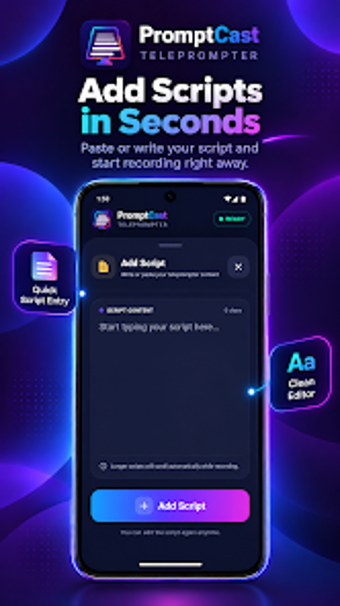
The interface aims for quick configuration, with on-screen controls for scrolling speed, font size, and color adjustments. Script text can be typed or pasted directly into the app, which lowers the barrier for users who do not want to move files between apps. The balance favors straightforward setup over configurable professional options.
Practical pick for creators who want simplicity with one caveat
The app suits creators who need quick, local teleprompting and integrated recording on Android; it minimizes setup and keeps scripts on the device. The main caveat is limited depth for advanced professional teleprompting workflows, so users who require highly granular cueing or external control hardware may find it insufficient. For straightforward on-device delivery, it performs as a compact, privacy-oriented tool.